Manual.ly Logo

Elecom EX-G M-XT2UR Petunjuk-Penggunaan

0,0 · 0 Ratings

345 · 4 Halaman

Bahasa indonesia

M: QW-35-FL
page

/ 4

Loading...
9c0ec621d4889b43e55ef339788529decbc7 page 3
A customer who purchases outside Japan should contact the local retailer in the country of purchasefor enquiries.
In “ELECOM CO., LTD. (Japan)”, no customer support is available forenquiries about purchases or usage in/from any countries
other than Japan. Also, no foreign language other than Japanese is available. Replacements willbe made under stipulation of
the Elecom warranty, but arenot available from outside of Japan.
Please see the current state of RoHS compliant:
請參考 RoHS 合規性目前的狀態:
Xin tham khảo theo hiện trạng tuân thủ RoHS:
www.elecom.co.jp/global/certification/
設備名稱:USB 軌跡球滑鼠 型號(型式):
M-XT2URBK
Equipment name Type designation (Type)
單元
Unit
限用物質及其化學符號
Restricted substances and its chemical symbols
鉛
Lead
汞
Mercury
鎘
Cadmium
六價鉻
Hexavalent
chromium
多溴聯苯
Polybrominated
biphenyls
多溴二苯醚
Polybrominated
diphenyl ethers
(Pb) (Hg) (Cd) (Cr
+6
) (PBB) (PBDE)
電路板 ○ ○ ○ ○ ○ ○
外殼 ○ ○ ○ ○ ○ ○
USB 接口 ○ ○ ○ ○ ○ ○
連接線 ○ ○ ○ ○ ○ ○
備考1.〝超出0.1 wt %〞及〝超出0.01 wt %〞係指限用物質之百分比含量超出百分比含量基準值。
Note 1 : “Exceeding 0.1 wt %” and “exceeding 0.01 wt %” indicate that the percentage content of the restricted substance exceeds the reference percentage value of presence condition.
備考 2.〝○〞係指該項限用物質之百分比含量未超出百分比含量基準值。
Note 2 :
“○”
indicates that the percentage content of the restricted substance does not exceed the percentage of reference value of presence.
備考 3.〝-〞係指該項限用物質為排除項目。
Note 3 : The “−” indicates that the restricted substance corresponds to the exemption.
ELECOM Singapore Pte. Ltd
Blk 10, Kaki Bukit Avenue 1,
#02-04 Kaki Bukit Industrial Estate, Singapore 417942
TEL : +65 6347 - 7747
FAX : +65 6753 - 1791
ELECOM Korea Co., Ltd.
Dome-Bldg 5F, 60, Nambusunhwan-ro 347-gil, Seocho-gu,
Seoul, 06730, South Korea
TEL : +82 (0) 2 - 1588 - 9514
FAX : +82 (0) 2 - 3472 - 5533
www.elecom.co.kr
ELECOM Sales Hong Kong Ltd.
2/F, Block A, 2-8 Watson Road, Causeway Bay, Hong Kong
TEL : +852 2806 - 3600
FAX : +852 2806 - 3300
新宜麗客(上海)商貿有限公司
上海市徐汇区肇嘉浜路1065甲号1603H室
電話 : +86 (0) 21-33680011
www.elecom.cn
ELECOM CO., LTD.
www.elecom.co.jp/global/
Trademark and name of the manufacturer:
Importer EU Contact :
Around The World Trading Inc.
Afon Building 223, Worthing Road
Horsham, RH12 1TL, United Kingdom
WEEE Disposal and Recycling Information
This symbol means that waste of electrical and
electronic equipment (WEEE) should not be
disposed as general household waste. WEEE
should be treated separately to prevent possible
harm to the environment or human health. Consult
your retailer or local municipal office for collection,
return, recycle or reuse of WEEE.
This device complies with Part 15 of the FCC Rules. Operation is subject
to the following two conditions: (1) this device may not cause harmful
interference, and (2) this device must accept any interference received,
including interference that may cause undesired operation.
In order to make improvements to this product, the design and
specifications are subject to change without prior notice.
Compliance status
www.elecom.co.jp/global/certification/
产品中有毒有害物质或元素的名称及含量
部件名称
有毒有害物质或元素
铅
(Pb)
汞
(Hg)
镉
(Cd)
六价铬
(Cr (VI))
多溴联苯
(PBB)
多溴二苯醚
(PBDE)
① 鼠标本体 × ○ ○ ○ ○ ○
② USB 接口 × ○ ○ ○ ○ ○
③ 连接线 × ○ ○ ○ ○ ○
○ : 表示该有毒有害物质在该部件所有均质材料中的含量均在 SJ/T 11363-2006 标准规定的
限量要求以下。
× : 表示该有毒有害物质至少在该部件的某一均质材料中的含量超出 SJ/T 11363-2006 标准
规定的限量要求。
Wired Trackball Mouse
Manual, Safety precautions, and Compliance with regulations
1st edition, November 15, 2019
©2019 ELECOM Co., Ltd. All Rights Reserved.
· Unauthorised copying and/or reproducing of all or part of this manual is prohibited.
· The specifications and appearance of this product may be changed without prior notice for product improvement purposes.
· When exporting this product, check the export regulations for the country of origin.
· Windows, Windows Vista and the Windows logo are trademarks of the Microsoft group of companies.
· Mac OS and Macintosh are trademarks of Apple Inc., registered in the U.S. and other countries.
· Company names, product names, and other names in this manual are either trademarks or registered trademarks.
MSC-M-XT2UR(EU) ver.111
T33407
RoHS
Safety Precautions
WARNING
If a foreign object (water, metal chip, etc.) enters the
product, immediately stop using the product, remove
the product from the PC. If you continue to use the
product under these conditions, it may cause a re
or electric shock.
CAUTION
Do not drop the product or otherwise subject it to
impacts.
If this product is damaged, immediately stop using it,
remove the product from the PC. After that, contact
the retailer from whom you purchased the product.
Continuing to use the product while it is damaged
may cause a re or electric shock.
This product does not have a waterproof structure.
Use and store this product in a place where the
product body will not be splashed with water or other
liquid.
Rain, water mist, juice, coffee, steam or sweat may
also cause product damage.
In no event will ELECOM Co., Ltd be liable for any lost
prots or special, consequential, indirect, punitive
damages arising out of the use of this product.
ELECOM Co., Ltd will have no liability for any loss of data,
damages, or any other problems that may occur to any
devices connected to this product.
Cleaning the Product
If the product body becomes dirty, wipe it with a soft, dry
cloth.
Prohibited action
Mandatory action
Situation that needs attention
Limitation of Liability
If the product is behaving abnormally, such as by
generating heat, smoke, or a strange smell,
immediately stop using the product, shut down the
PC, and then sufciently check whether the product
is generating heat while being careful to avoid being
burned. Then, remove the product from the PC. After
that, contact the retailer from whom you purchased
the product. Continuing to use the product under
these conditions may cause a re or electric shock.
Do not attempt to disassemble, modify or repair this
product by yourself, as this may cause a re, electric
shock or product damage.
Do not put this product in re, as the product may
burst, resulting in a re or injury.
Do not insert or remove the connector with wet
hands. Also, do not make alternations to or forcefully
bend the connector.
Doing so may cause a re or electric shock.
Do not place this product in any of the following
environments:
In a car exposed to sunlight, a place exposed to
direct sunlight, or a place that becomes hot (around
a heater, etc.)
In a moist place or a place where condensation may
occur
In an uneven place or a place exposed to vibration
In a place where a magnetic eld is generated (near
a magnet, etc.)
In a dusty place
If this product is not going to be used for one month
or longer, remove it from the PC.
When you no longer need to use this product, be
sure to dispose of them in accordance with the local
ordinances and laws of your area.
Use of a volatile liquid (paint thinner, benzene, alcohol,
etc.) may affect the material quality and color of the
product.
Do not use this product with any device that may
signicantly be affected in the case of this product
malfunctioning.
Only use this product with PCs and video game
systems.
Precauzioni per la Sicurezza
AVVISO
Se un corpo estraneo (acqua, trucioli di metallo, ecc.)
entra nel prodotto, interrompere immediatamente
l’utilizzo del prodotto, rimuovere il prodotto dal PC. Se
si continua a utilizzare il prodotto in queste condizioni,
si può vericare un incendio o scosse elettriche.
ATTENZIONE
Non far cadere il prodotto e non sottoporlo a urti.
Se il prodotto è danneggiato, interrompere
immediatamente l'utilizzo, rimuovere il prodotto dal
PC. Dopo di che, contattare il rivenditore dal quale
avete acquistato il prodotto. Continuando a utilizzare
il prodotto mentre è danneggiato può causare un
incendio o scosse elettriche.
Questo prodotto non è dotato di struttura impermeabile.
Utilizzare e conservare questo prodotto in un luogo in
cui non possa essere schizzato con acqua o altri liquidi.
Pioggia, nebbia d'acqua, succo di frutta, caffè, vapore
o sudore possono anche causare danni al prodotto.
In nessun caso, ELECOM Co., Ltd verrà ritenuta
responsabile per la perdita di protti o danni speciali,
conseguenti, indiretti o indennizzi derivanti dall’uso di
questo prodotto.
ELECOM Co., Ltd non si assume alcuna responsabilità per
la perdita di dati, danni o altri problemi che possono
vericarsi a qualsiasi dispositivo collegato a questo prodotto.
Pulizia del prodotto
Se il prodotto si sporca, pulirlo con un panno morbido e
asciutto.
Azione proibita
Azione Obbligatoria
Situazione che necessita di particolare attenzione
Limitazione di Responsabilità
Se il prodotto si comporta in modo anomalo, ad
esempio genera calore, fumo, o emette uno strano
odore, interrompere immediatamente l’utilizzo del
prodotto, spegnere il PC e poi controllare
adeguatamente se il prodotto sta generando calore
facendo attenzione a non bruciarsi. Poi, rimuovere il
prodotto dal PC. Dopo di che, contattare il rivenditore
dal quale avete acquistato il prodotto. Continuando a
utilizzare il prodotto in queste condizioni, si può
vericare un incendio o scosse elettriche.
Non provare a smontare, modicare o riparare questo
prodotto da soli, in quanto ciò può causare incendio,
shock elettrico o danni al prodotto.
Non gettare il prodotto nel fuoco, in quanto potrebbe
bruciare, provocando incendio o lesioni gravi.
Non inserire o rimuovere il connettore con le mani
bagnate. Inoltre, non effettuare modiche e non
piegare con forza il connettore.
Farlo può causare incendio o scossa elettrica.
Non posizionare il prodotto in uno dei seguenti luoghi:
In un’auto esposta alla luce del sole, in un luogo
esposto alla diretta luce del sole o in un luogo che
diventa molto caldo (vicino a un calorifero, ecc.)
In un luogo umido o dove si forma della condensa
Su una supercie ondulata o esposta a vibrazioni
In un luogo in cui viene generato un campo
magnetico (vicino a un magnete, ecc.)
In un luogo polveroso
Se si ha intenzione di non utilizzare il prodotto per un
mese o più, rimuoverlo dal PC.
Quando non si utilizza più il prodotto, si raccomanda
di smaltirlo secondo le leggi e disposizioni locali.
L’utilizzo di un liquido inammabile (diluenti, benzene,
alcool, ecc.) può pregiudicare la qualità del materiale
e il colore del prodotto.
Non utilizzare questo prodotto con qualsiasi
dispositivo che potrebbe venire danneggiato in modo
signicativo in caso di malfunzionamento del prodotto.
Utilizzare questo prodotto solo con PC e console per
videogiochi.
Sicherheitsvorkehrungen
ACHTUNG
Wenn ein Fremdkörper (Wasser, Metallsplitter usw.)
in das Produkt eindringt, brechen Sie die
Verwendung des Produkts sofort ab und entfernen
Sie das Produkt vom PC. Wenn Sie das Produkt
unter diesen Bedingungen weiter verwenden, kann
dies zu einem Brand oder Stromschlag führen.
ACHTUNG
Lassen Sie das Produkt nicht fallen und setzen Sie es
keinen anderen Schlägen aus.
Falls dieses Produkt beschädigt ist, hören Sie sofort auf,
es zu verwenden, und entfernen Sie das Produkt vom
PC. Kontaktieren Sie anschließend den Verkäufer, von
dem Sie das Produkt erworben haben. Wenn Sie das
Produkt weiterhin verwenden, während es beschädigt
ist, kann es zu einem Brand oder Stromschlag kommen.
Dieses Produkt hat keine wasserdichte Struktur.
Verwenden und lagern Sie dieses Produkt an einem
Ort, an dem der Produktkörper nicht mit Wasser oder
anderen Flüssigkeiten bespritzt wird.
Regen, Wassernebel, Saft, Kaffee, Dampf oder
Schweiß kann ebenfalls zu Produktschäden führen.
ELECOM Co. Ltd haftet unter keinen Umständen für Verluste
oder spezielle, konsequente, indirekte oder straiche
Schäden, die durch die Nutzung des Produkts entstehen.
ELECOM Co. haftet nicht für eventuelle Verluste von Daten,
Schäden oder andere Probleme mit Geräten, die mit
diesem Produkt verbunden sind.
Reinigung des Produkts
Falls der Produktkörper schmutzig wird, wischen Sie es mit
einem weichen und trockenen Tuch ab.
Untersagte Handlung
Unbedingte Handlung
Geben Sie hierbei Acht
Haftungsbegrenzung
Falls sich das Produkt unnormal verhält, z. B. durch
Hitzeentwicklung, Rauchentwicklung oder einen
ungewöhnlichen Geruch, schalten Sie das Produkt
sofort aus, fahren den PC herunter und überprüfen
Sie ausreichend, ob das Produkt Wärme erzeugt,
während Sie darauf achten, dass Sie sich nicht
verbrennen. Dann entfernen Sie das Produkt vom PC.
Kontaktieren Sie anschließend den Verkäufer, von
dem Sie das Produkt erworben haben. Falls Sie das
Produkt unter diesen Bedingungen weiter verwenden,
kann dies zu einem Brand oder Stromschlag führen.
Versuchen Sie nicht, dieses Produkt selbstständig
auseinander zu nehmen, zu ändern oder zu reparieren,
da es dadurch zu einem Brand, Elektroschock oder
zu Schäden am Produkt kommen kann.
Setzen Sie dieses Produkt nicht Feuer aus, da es
platzen kann, was zu einem Brand oder einer
Verletzung führen kann.
Den Stecker nicht mit nassen Händen einstecken
oder entfernen. Nehmen Sie keine Veränderungen am
Stecker vor und verbiegen Sie ihn nicht gewaltsam.
Dies kann zu einem Brand oder Stromschlag führen.
Bewahren Sie dieses Produkt nicht an folgenden
Orten auf:
In einem Auto unter Aussetzung von Licht, einem Ort,
der dem Sonnenlicht ausgesetzt ist oder einem Ort,
der heiß wird (in der Nähe eines Heizkörpers usw.)
An einem feuchten Ort oder an einem Ort, an dem
es zu Kondensation kommt.
An einem schiefen Ort oder an einem Ort, wo es zu
Vibrationen kommen kann.
An einem Ort, wo ein Magnetfeld erzeugt wird
(neben einem Magnet usw.)
An einem staubigen Ort
Falls dieses Produkt einen Monat oder länger nicht
verwendet wird, entfernen Sie es vom PC.
Wenn Sie dieses Produkt nicht mehr benötigen,
entsorgen Sie es gemäß den örtlichen Vorschriften
und Gesetzen in Ihrer Region.
Die Nutzung von üchtigen Flüssigkeiten
(Farbverdünner, Benzol, Alkohol usw) kann die
Materialqualität und die Farbe des Produkts verändern.
Verwenden Sie dieses Produkt nicht bei Geräten, die
bei einer Fehlfunktion des Produkts erheblich
beeinträchtigt werden könnten.
Nutzen Sie dieses Produkt nur mit PCs und
Videospielkonsolen.
Consignes de sécurité
AVERTISSEMENT
Si un corps étranger (de l’eau, un copeau de métal,
etc.) entre dans le produit, arrêtez immédiatement de
l’utiliser, déconnectez le produit du PC. Si vous
continuez à utiliser le produit dans ces conditions, il
peut provoquer un incendie ou une électrocution.
ATTENTION
Ne pas laisser tomber le produit ou encore le soumettre
aux impacts.
Si ce produit est endommagé, cessez immédiatement
de l’utiliser, retirez-le du PC. Après cela, contactez le
détaillant chez qui vous avez acheté le produit.
Continuer à utiliser le produit, alors qu’il est endommagé
peut provoquer un incendie ou une électrocution.
Ce produit n’a pas une structure imperméable à l’ eau.
Utilisez et conservez ce produit dans un endroit où le
corps du produit ne sera pas éclaboussé par de l’eau
ou un autre liquide.
La pluie, les brumes d’eau, du jus, du café, de la vapeur
ou de la sueur peuvent aussi causer des dommages au
produit.
En aucun cas ELECOM Co., Ltd ne sera tenu pour
responsable des bénéces perdus ou spéciaux,
consécutifs, indirects, des dommages-intérêts punitifs
découlant de l’utilisation de ce produit.
ELECOM Co., Ltd n’assumera aucune responsabilité pour
toute perte de données, dommages, ou tout autre problème
qui pourrait survenir sur les appareils connectés à ce produit.
Nettoyage du produit
Si le corps du produit est sale, nettoyez-le avec un chiffon doux
et sec.
Action interdite
Action obligatoire
Situation nécessitant une attention
Limitations de responsabilité
Si le produit présente un dysfonctionnement tel que la
production de chaleur, de fumée, ou une odeur
suspecte, arrêtez immédiatement d’utiliser le produit,
débranchez le PC, puis vériez sufsamment s’il
produit de la chaleur tout en évitant de vous faire brûler.
Ensuite, retirez le produit du PC. Après cela, contactez
le détaillant chez qui vous avez acheté le produit. Si
vous continuez à utiliser le produit dans ces conditions,
il peut provoquer un incendie ou une électrocution.
N’essayez pas de démonter, modier ou réparer ce
produit par vous-même, car ceci pourrait déclencher
un incendie, causer une électrocution ou
endommager le produit.
Ne pas placer ce produit au feu, car il pourrait
exploser, causant un grave incendie ou des blessures.
Ne pas insérer ou retirer le connecteur avec les mains
humides. En outre, ne pas effectuer des
modications sur le connecteur ou le plier avec force.
Faire ceci peut provoquer un incendie ou une
électrocution.
Ne pas placer ce produit dans l’un des environnements
suivants:
Dans une voiture ou des endroits exposés au soleil,
ou un emplacement qui tend à être chaud (auprès
d’un radiateur, etc.)
Dans un endroit humide ou un lieu où la condensation
pourrait se produire
Sur une surface inégale ou un endroit exposé aux
vibrations
Dans un endroit où un champ magnétique est généré
(près d’un aimant, etc.)
Dans un endroit poussiéreux
Si ce produit ne doit pas être utilisé pendant un mois
ou plus, déconnectez-le du PC.
Au cas où vous ne souhaiteriez plus utiliser ce produit,
assurez-vous de vous en débarrasser conformément
à la législation en vigueur dans votre localité.
L’usage d’un liquide volatile (diluant à peinture, benzène,
alcool, etc.) peut affecter la qualité du matériau et la
couleur du produit.
Ne pas utiliser ce produit avec n’importe quel
appareil qui pourrait sérieusement en être affecté, au
cas où il présenterait des dysfonctionnements.
N’utilisez ce produit qu’avec des systèmes pour PC
et jeu vidéo.
Precauciones de seguridad
ADVERTENCIA
Si se introduce un objeto extraño en el producto
(agua, astilla de metal, etc.) deje de utilizar el
producto inmediatamente, extraiga el receptor del
PC, retire el producto del PC. Si continúa utilizando
el producto en estas condiciones, puede provocar
un incendio o una descarga eléctrica.
PRECAUCIÓN
No deje caer el producto ni lo someta a impactos.
Si este producto está dañado, deje de usarlo
inmediatamente, retire el producto del PC. Después
de eso, póngase en contacto con el distribuidor
donde compró el producto. Si continúa usando el
producto cuando está dañado puede provocar un
incendio o una descarga eléctrica.
Este producto no dispone de estructura impermeable.
Utilice y almacene este producto en un lugar donde
la carcasa del producto no se salpique con agua u
otro líquido.
La lluvia, vapor de agua, zumo, café, vapor o sudor
también puede causar daños al producto.
En ningún caso ELECOM Co., Ltd se responsabilizará de
ninguna pérdida de benecios, o daño especial, resultante,
indirecto, o punitivo derivado del uso de este producto.
ELECOM Co., Ltd no se responsabilizará de ninguna pérdida
de datos, daños, o cualquier otro problema que pueda
ocurrir a cualquier dispositivo conectado a este producto.
Limpieza del producto
Si se ensucia la carcasa del producto, límpiela con un paño
seco y suave, etc.
Acción prohibida
Acción obligatoria
Situación que necesita atención
Limitación de responsabilidad
Si el producto se comporta de forma anormal, como
por ejemplo genera calor, humo o un olor extraño,
deje de usar el producto inmediatamente, apague el
PC y a continuación compruebe si el producto
genera calor teniendo cuidado de no quemarse. A
continuación, retire el producto del PC. Después de
eso, póngase en contacto con el distribuidor donde
compró el producto. Si continúa utilizando el
producto en estas condiciones, puede provocar un
incendio o una descarga eléctrica.
No intente desarmar, modicar o reparar este
producto usted mismo, ya que podría provocar un
incendio, descarga eléctrica o dañar el producto.
No arroje este producto al fuego, ya que podría
explotar y provocar un incendio o lesiones.
No inserte ni retire el conector con las manos
mojadas. Además, no realice modicaciones ni doble
a la fuerza el conector.
Si lo hace, se podría producir un incendio o una
descarga eléctrica.
No coloque este producto en ninguno de los siguientes
entornos:
En un automóvil expuesto a la luz del sol, en un
lugar expuesto a la luz directa del sol, o en un lugar
que se caliente (cerca de una estufa, etc.).
En un lugar húmedo o en un lugar donde se pueda
formar condensación.
Sobre una supercie desigual o en un lugar
expuesto a las vibraciones.
En un lugar donde se genere un campo magnético
(cerca de un imán, etc.).
En un lugar polvoriento.
Si no se va a utilizar este producto durante un mes o
más, retírelo del PC.
Cuando ya no necesite usar este producto, no olvide
desecharlo en conformidad con las regulaciones y
leyes locales de su zona.
El uso de un líquido volátil (disolvente, benceno, alcohol,
etc.) puede afectar a la calidad del material y el color
del producto.
No use este producto con cualquier dispositivo que
pueda verse afectado signicativamente en caso de
mal funcionamiento de este producto.
Sólo use este producto con ordenadores y sistemas
de videojuegos.
MSIP-REM-
ELJ-M-XT2UR
Deutsch (DE)
Français (FR)
Español (ES)
Italiano (IT)

Chat dengan manual Elecom EX-G M-XT2UR Anda menggunakan AI

Dapatkan jawaban AI instan dari manual Elecom EX-G M-XT2UR Anda

Tanyakan apa saja tentang Elecom EX-G M-XT2UR. Jawaban berasal dari manual ini, beserta halaman yang menjadi dasarnya.

EX-G M-XT2UR Jadwal Perawatan

Sesuai kebutuhan
Bersihkan area kontak trackball

Hapus debu dari tiga area kontak bola penyangga merah menggunakan cotton bud. Hati-hati agar tidak merusak sensor optik.

Sesuai kebutuhan
Bersihkan bodi produk

Jika bodi produk menjadi kotor, lap dengan kain lembut yang kering. Jangan gunakan cairan mudah menguap seperti thinner cat atau alkohol.

M: qwen/qwen3.8-flash

Ajukan sebuah Pertanyaan

0/1000

Apakah Anda merekomendasikan EX-G M-XT2UR?

Ya No

Preguntas Frecuentes Preguntas

A

Geser pengatur kecepatan pointer ke atas atau ke bawah. Lampu indikator berkedip sekali untuk 750 dpi dan dua kali untuk 1500 dpi.

341

A

Ya, ini bekerja dengan Macintosh OS X 10.10 atau yang lebih baru. Tombol kembali dan maju dapat digunakan dengan perangkat lunak.

341

A

Tidak, ini tidak tahan air. Paparan hujan atau cairan dapat menyebabkan kerusakan dan membatalkan garansi.

341

A

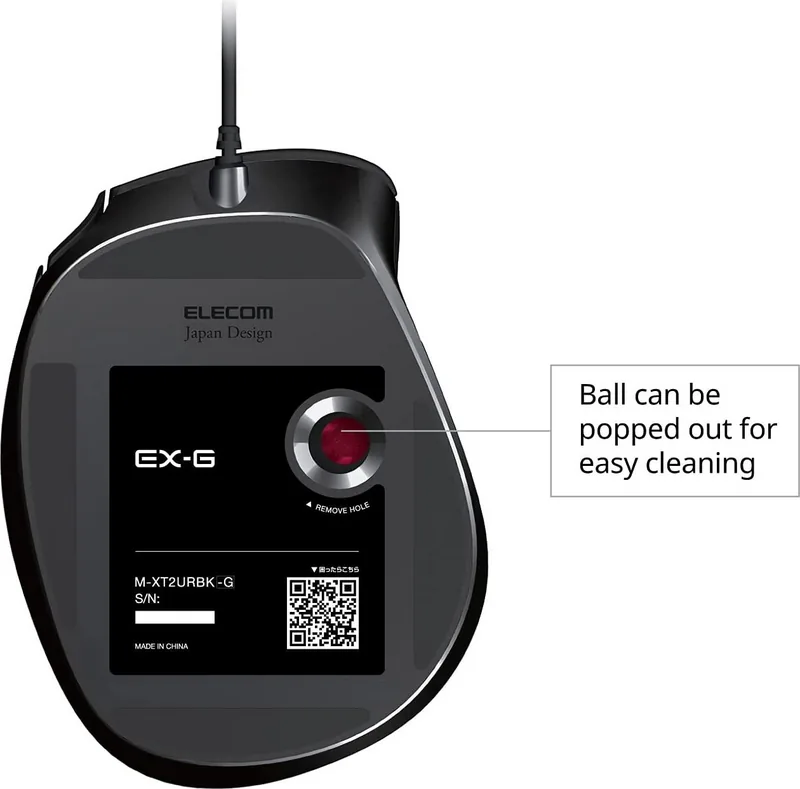
Dorong bola keluar dari belakang. Gunakan tusuk kapas untuk membersihkan area kontak bola penopang merah dengan hati-hati.

341

A

Driver menginstal secara otomatis. Unduh ELECOM Mouse Assistant untuk fungsi tombol lanjutan.

341

A

Lebarnya sekitar 95 mm, dalamnya 125 mm, dan tingginya 48 mm.

341

A

Tidak, jangan mencoba membongkar atau memodifikasi produk karena dapat menyebabkan kebakaran atau sengatan listrik.

341

M: QW-35-FL

Keunggulan dan Kekurangan

advantages

  • DPI yang dapat disesuaikan antara 750 dan 1500 untuk kebutuhan presisi yang berbeda.
  • Roda miring memungkinkan pengguliran horizontal untuk browsing web yang efisien.
  • Desain trackball mengurangi ketegangan pergelangan tangan dibandingkan dengan mouse tradisional.
  • Dukungan perangkat lunak memungkinkan kustomisasi tombol di Mac dan Windows.
  • Proses pembersihan sederhana dengan mekanisme bola yang dapat dilepas.
VS

Kekurangan

  • Koneksi kabel membatasi mobilitas dibandingkan dengan model nirkabel.
  • Perangkat lunak ELECOM Mouse Assistant tidak kompatibel dengan Windows RT.
  • Memerlukan pembersihan rutin untuk mempertahankan gerakan pointer yang akurat.
  • Tidak tahan air sehingga cairan dapat menyebabkan kerusakan permanen pada perangkat.
  • Dimensi mungkin besar bagi pengguna dengan ruang meja kecil.
M: QW-35-FL

Produk Spesifikasi

Tipe

Trackball

Tombol

5

Koneksi

Kabel (1,50 m), USB-A 2.0

Catu Daya

USB

Dimensi (LxTxD)

9,50 x 4,80 x 12,40 cm

Berat

0,15 kg

Fitur

Saklar Omron

M: QW-35-FL

product description

Menemukan Presisi dengan Elecom EX-G MXT2

Bagi profesional yang mencari kenyamanan ergonomis dan kontrol yang presisi, Elecom EX-G MXT2 menawarkan solusi unik untuk tugas komputasi harian. Mouse trackball kabel ini menonjol di pasar yang didominasi oleh desain optik tradisional. Ini memungkinkan pengguna mengontrol kursor dengan memutar bola menggunakan ibu jari mereka daripada memindahkan seluruh perangkat di atas permukaan meja. Desain ini secara signifikan mengurangi ketegangan pergelangan tangan dan kelelahan, membuatnya ideal untuk sesi kerja panjang di lingkungan kantor.

Salah satu fitur unggulan adalah pengaturan resolusi yang sangat dapat disesuaikan. Anda dapat beralih antara 750 hingga 1500 dpi menggunakan pengatur kecepatan pointer yang didedikasikan. Lampu indikator berkedip dengan jelas menunjukkan posisi pengaturan Anda saat ini. Fleksibilitas ini memastikan navigasi yang lancar baik Anda mengedit grafik detail maupun menelusuri web secara kasual di layar. Roda miring yang inovatif lebih lanjut meningkatkan produktivitas dengan memungkinkan pengguliran horizontal tanpa memerlukan gerakan kompleks selama penggunaan normal.

Kompatibilitas lintas platform adalah kekuatan utama. Perangkat ini bekerja mulus dengan Windows 10 dan 8.1, serta Macintosh OS X 10.10. Namun, untuk fitur lanjutan seperti penugasan tombol, pengguna harus mengunduh ELECOM Mouse Assistant. Perangkat lunak ini membuka potensi penuh, mengaktifkan fungsi tombol kembali dan maju pada sistem Mac. Perhatikan bahwa Windows RT tidak didukung oleh perangkat lunak asisten.

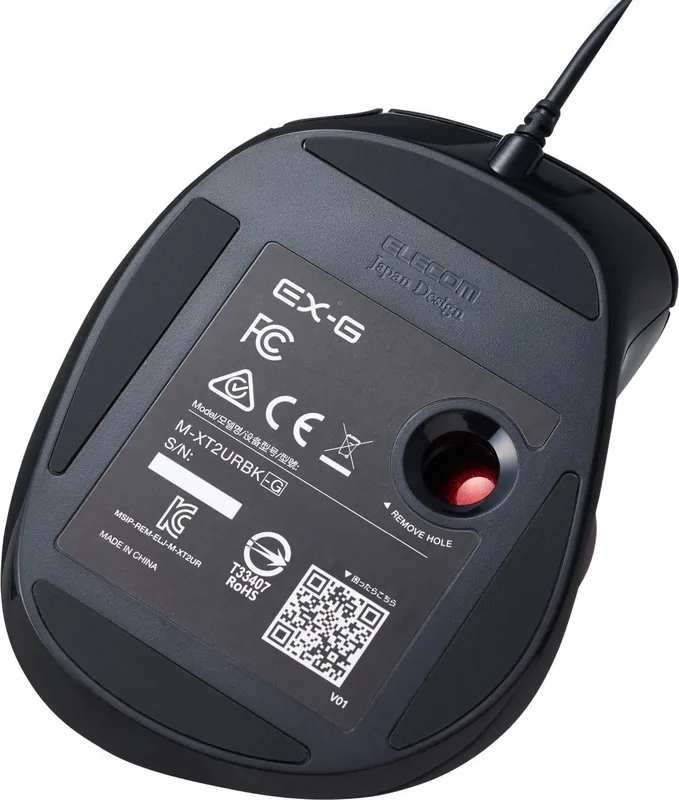
Pemeliharaannya sederhana namun memerlukan kehati-hatian. Bola dapat dilepas dengan mudah untuk pembersihan untuk memastikan kinerja yang konsisten. Pengguna harus menggunakan tusuk kapas untuk menghilangkan debu dari area kontak di mana bola penopang menyentuh trackball di bawahnya. Perlu berhati-hati agar tidak merusak sensor optik selama proses pembersihan ini. Tindakan pencegahan keselamatan menyarankan agar tidak menggunakan perangkat di lingkungan basah atau dekat magnet kuat. Jika terjadi panas yang aneh, hentikan penggunaan segera dan hubungi pengecer Anda.

Memahami perangkat keras penting untuk kinerja optimal. Produk ini menyertakan spesifikasi rinci yang ditemukan dalam Panduan Elecom EX-G MXT2 yang tersedia di situs web resmi. Meskipun panduan ini mencakup instalasi, mengetahui komponen internal membantu mencegah kerusakan tidak sengaja pada konektor USB. Ingat bahwa perangkat tidak tahan air dan harus dijauhkan dari cairan.

Singkatnya, mouse trackball ini menyediakan metode yang kuat untuk menavigasi ruang digital. Ini menggabungkan daya tahan dengan desain ergonomis. Baik untuk pekerjaan kantor atau proyek kreatif, Elecom EX-G MXT2 memastikan keandalan untuk setup komputer Anda. Ini pas dengan sebagian besar tata letak meja. Mohon periksa panduan untuk tips keselamatan sebelum memulai.

M: QW-35-FL

© Copyright 2026 Manual.ly